
9.0 Update available!
You can check the full list of features here
Your classroom.
Beautifully in hand.
Your gradebook, planner and classroom tools, together.
For macOS, iPhone and iPad
One-time purchase
No subscriptions or in-app purchases.
Works offline
Use iDoceo anywhere, even without internet.
Your data stays yours
Your classes and data are stored on your device.
Made for
teachers.
Plan, assess and organise your day.
YOUR EVERYDAY TOOLS
Ready for the way you teach.
Assess with confidence
Gradebook
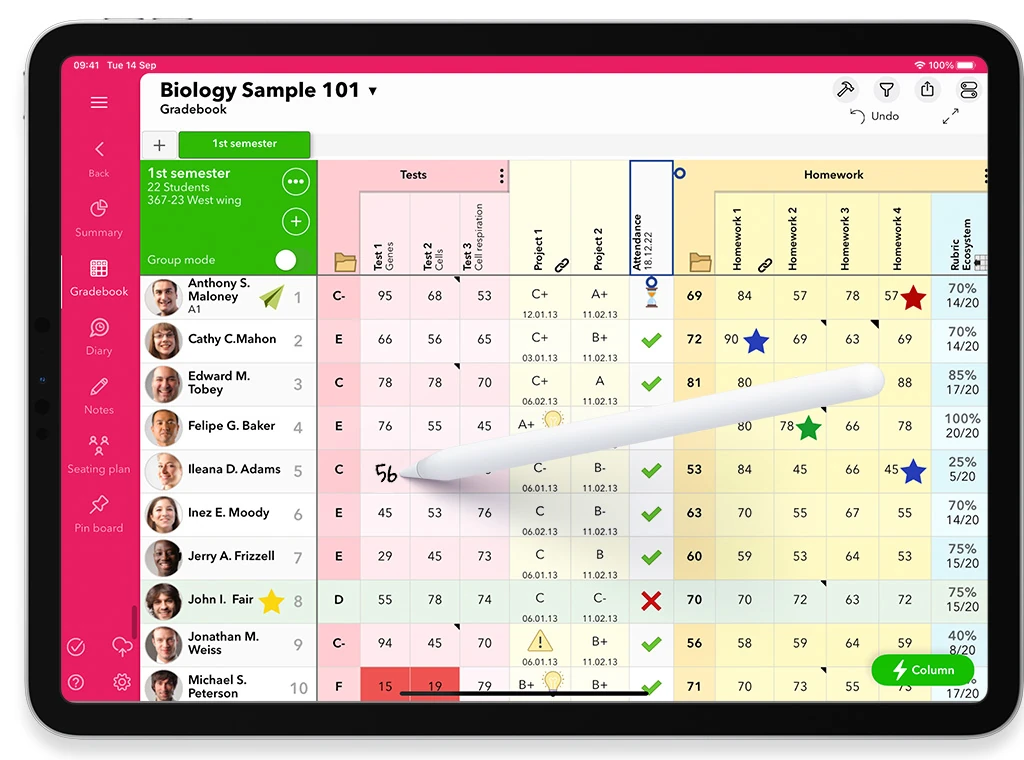
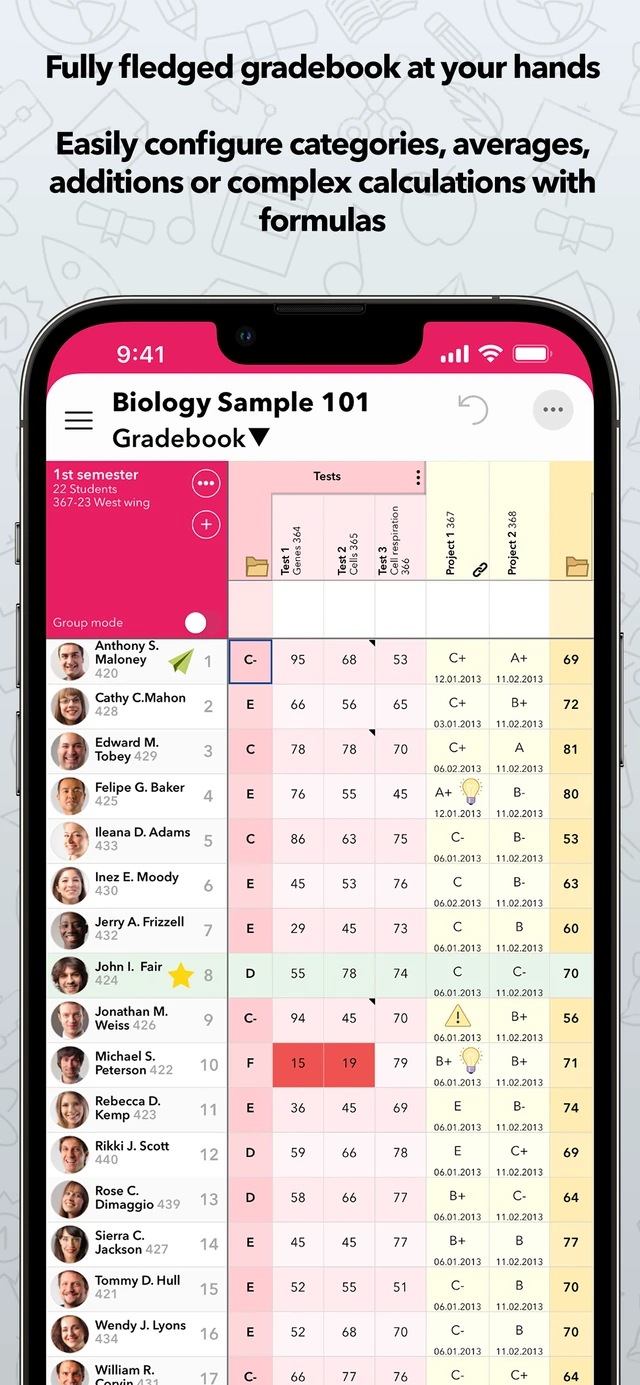
Record marks, rubrics and observations in a gradebook that works your way. Calculate averages or build your own formulas.
Create clear reports and export to PDF, XLS or CSV.
Keep lessons in order
Planner & Diary
Bring lesson plans and daily notes together. Add photos, audio, files and handwritten notes alongside your planning.
Keep the resources for each lesson close at hand.
See the whole class
Seating Plan
Arrange your classroom, create groups and record attendance from a visual seating plan. Keep notes connected to each student.
Save different layouts for each class.
iDoceo Connect
Publish exams and assessments online for your students.
They can answer from any browser, individually or in live team challenges.
Explore iDoceo ConnectTeam challenge
Illustrative classroom activity
Live assessments
Live activities and team challenges for your class.
Tests & rubrics
Create and share assessments and rubrics.
Class insights
Follow participation and progress with visual reports.
Connected to your classroom
Full integration with Moodle, Google Classroom and Microsoft Teams
 Moodle
 Google Classroom
 Microsoft Teams
Your information finally organized as you want
Defend yourself from unnecessary bureaucracy
Keep and manage all your work information on your own terms.
Configure it as you like or share already made templates with other users.
Easily collect any type of relevant information in class so that later you can send reports or export your data with a single click.
INSIDE iDoceo
Take a closer look.
Choose a view. Find your way of working.
Your all-in-one solution
Powerful.
Helpful.
Awesome.
Works on iPad, iPhone with iOS12.5 or higher
and Mac with 10.15.7 (Intel, M1 and M2) or higher


GradeBook
Calculate simple averages or set up complex formulas
Create reports, export to PDF, XLS, CSV or sync with Google Classroom and iDoceo Connect


Planner & Diary
Add resources of any kind, take photos, record videos, audio, handwritten notes and more


Seating Plan
Up to 10 seating plans per class, custom backgrounds and different types of views.

No subscriptions
There are no in-app purchases or hidden costs. One license per user is required.
Includes updates, support, iDoceo Connect and access to the online library of resources.

An Universal purchase
iDoceo is Offline
No one except you has access to your data.
iDoceo is not an online platform nor does it have servers with personal (or other) data anywhere.
If you turn on cross-device sync, your data is encrypted when resting and also when in transit on Apple servers. They remain confidential and no one has access to them except you.


Privacy & Security. Our priorities.

Completed
Rubrics available
Publish exams and evaluations online for your students
Student access is pseudonymised, encrypted and secure.
Students can access from the browser any computer or mobile device


Defend yourself from unnecessary bureaucracy
Configure it as you like or share already made templates with other users
Easily collect any type of relevant information in class so that later you can
send reports or export your data with a single click


Some of its features
iDoceo's features list is huge but you don't need to know them all, you can use iDoceo with just a few of them and move forward one step at a time or just stay with only the ones you need.

Simple calculations
Simple averages or complex formulas.
Use arithmetic, weighted averages, conditions and resits to calculate results your way.

Add students easily
Import from CSV or XLS.
Bring in student lists from other platforms with the import wizard, or use templates shared by colleagues.

Google Classroom & Moodle
Sync with both platforms.
Sync your data with Google Classroom and Moodle. Import files from EdPuzzle, Socrative, Quizizz or other apps and learning platforms.

Class and students reports
Class, individual and group reports.
Create reports in PDF, CSV or XLS, customise their headers and share them by email.

Rubrics
For assessment and co-evaluation.
Build your own rubrics or choose from thousands in the online library.

Add resources anywhere
Keep everything where you need it.
Attach files, links, photos, audio and video to your diary, students, cells, columns and pin boards.


Our users
These are some of your comments on the App Store!
This app has saved my life, literally. It's like having the best of both worlds all in one. The notes you take for the lessons and links, resources, photos handy. What's more, the customer service is outstanding. Whenever I have a problem they're quick to answer and give a feasible solution. Thanks.
★★★★★
Outstanding
App Store review
I have tried every digital teacher planner on the App Store over the years, and they were all limited in features, outdated, or eventually abandoned. iDoceo made an ideal all-in-one package. Kudos to you guys. I hope you will maintain this product indefinitely. Thank you.
★★★★★
A+
App Store review
I have used this planner for many years and have never regretted having it. IDoceo is a great planner very customizable and flexible. I would recommend this to anyone looking for a way to stay organized in planning and record keeping.
★★★★★
Great Planner
App Store review
I really could be a sales person for this application b/c after 35 years of teaching elementary music (700 students a week) it has given me the ability to truly document my student progress and get to know them (ie: notes and pictures). I have seating charts as well as seating plans for center work. LOVE THIS APP
★★★★★
Outstanding for Music teachers
App Store review
If you are computer literate, the setup of grade books isn’t too difficult and is quick and easy. Within half a day, I had set up several classes of information and set up pending assignments. The ease of see all the grades in an organized way has put the burden of grading away!
★★★★★
Easy Setup
App Store review
Took a day to get my head around the platform, BUT WORTHWHILE. No pain no gain! NEXT LEVEL UP teacher data support to make informed decisions, assessments, classroom management. I REALLY REALLY loved the effective data transfer from one platform to another such as importing rubrics, class lists and many more. Loved the emoji links, and other classroom collaborative learning tools integrated Apps. It will require your time to enter your classroom data (however just need to import your files I.e word rubric, cvs class lists etc). Short term pain for long term gain.
★★★★★
Next level up
App Store review
I work at a university and use this app daily to keep track of grades and attendance. It is by far the best and most flexible app out there. Great customer support as well. Highly recommend.
★★★★★
Amazing App for Teachers
App Store review
I iDoceo Review (Long-Term User Perspective) I’ve been using iDoceo for several years now, and it has become an essential tool in my teaching toolkit. From the beginning, it stood out as a powerful, all-in-one teacher’s assistant, and over time it has only gotten better. The developers continue to refine and expand its features, responding to real classroom needs with every update. What I love most is how flexible and customizable it is. Whether I’m managing class rosters, tracking attendance, planning lessons, recording grades, or storing student work, iDoceo handles it seamlessly. The gradebook is particularly robust — it supports multiple assessment types, weighting systems, and custom icons or color codes that make tracking student progress visually intuitive. The lesson planner is another feature that has evolved impressively. It’s now possible to integrate multimedia, attach files, and sync planning across multiple classes or days with ease. The ability to link seating plans with student data (e.g., notes, photos, grades, or behavior logs) is incredibly useful — especially for parent interviews or team meetings. Importantly, data security and offline access give iDoceo a big edge. Everything is stored locally on the device (unless I choose to back up to cloud services), so I don’t have to worry about unreliable Wi-Fi during a busy school day. In recent versions, the addition of tools like rubric-based assessment, audio notes, annotations, and Apple Pencil support have further enriched the experience — especially for teachers who prefer a tablet-based workflow. In short, iDoceo keeps evolving without losing its intuitive core, and it continues to support the diverse demands of modern teaching. Whether you’re a primary teacher juggling multiple subjects or a university lecturer managing large cohorts, it’s a well-designed, professional-grade app that genuinely supports educators.
★★★★★
An Excellent Program for the busy Teacher
App Store review
As a teacher, There are only a handful of apps I constantly have used over the years. iDoceo is one of them! Grading and seating charts are a constant in my life. And since iDoceo I no longer struggle.
★★★★★
Go to app for Teachers!
App Store review
I have been teaching for twenty years and using electronic gradebooks for most of that time. If you just want simple and straight forward gradekeeping and attendance, it does all of that easily and intuitively. If you have more complex needs (rubrics, complex calculations, icon based calculations, behavior tracking) it can do that with some tweaking, and then it runs just as smooth. When I have had trouble, the developer has always been very prompt and helpful with his replies. He updates and improves pretty frequently and has even included some of my suggestions in his updates! How is that for responsiveness!
★★★★★
Does just about everything
App Store review
This app is so powerful. I haven't tapped in to all it can do with it, but it is the best $9.99 I've ever spent on my teaching. Don't think, just buy it! You won't regret it.
★★★★★
I Love This App!!!
App Store review
I love iDoceo. It organizes my grade book SO easily and I can use my template across other classes (so I don’t have to start over for every class). I highly recommend!
★★★★★
Definitely worth it!
App Store review
Since using iDoceo, I have not been happier. The ease of entering grades while circulating my classroom (because I have it on my ipad), as well as the ability to sync grades across devices (I have it ipad, iphone and macbook) is a much welcomed bonus.
★★★★★
Amazing
App Store review
As a teacher, when I first got my iPad, to make most of it I wanted an app where I could add profiles for each of my students, pictures, data infos and take notes and grade them. Tries 10/15 apps, but little did I know this app was all I could ask and more. You even have a planner built in, different grade typed all around the world, or even create your own grading system. Beautiful UI and even more practical UX. Im in awe, and if you’re a teacher or professor, I would definitely recommend this.
★★★★★
Phenomenal aprogram
App Store review
I just want to say how absolutely grateful I am to the team behind iDoceo. It is my favorite Edtech tool and I am so grateful for everything it has helped me with. I live abroad and sometimes work at schools that do not have a system set in place and iDoceo has been my go-to application. Even at schools that have a system, I love iDoceo and it’s many uses, that 9 update was WOW!!! What an update! It just accelerated everything that this application did and truly kept it to the next level. I cannot sing praises enough for the application, I tell everyone about it. Every time I use it, I just think how much I love everything it allows me to do. I really hope that they just keep getting better, and most importantly I hope they stay reasonable in cost and accessibility for the people who use and need this application. Please never forget the individual teachers who use this in places where nothing else exist
★★★★★
The Best partner you could ask for
App Store review
I teach at an alternative school with about 50-75 students. I use the gradebook for individual classes. In addition to my teaching classes, I created a "master" class with the entire student body. I use that "class" to keep track of the daily attendance register and as a student information database. It is easy to copy the students' information from one class to another. Very versatile with regular updates and improvements. Developer has great communication with users and usually responds to questions quickly. Recommend 100%!!
★★★★★
Great App
App Store review
So far so good! I'm a NYC public school educator. The app allows me to import rosters easily and organize data in multiple ways. I'm using the app installed on an Apple laptop. The app is self-enclosed (housed only in your computer or device) and does not share PPi publicly (I am not using the cloud version). I recommend downloading at home if you're a NYC Teacher, since the NYCDOE does not allow downloading in the network for security purposes.
★★★★★
New User 2024-2025 September
App Store review
I was never one as a secondary school teacher for grade books and planners. Felt it was like doing the "the job" twice so when I came across idoceo a few years ago it was a really game changer for me, my record keeping and planning. The layouts, the ease of use over my macbook, ipad and iphone verisons really mean that I can use any of them to take attendance especially. The student profile of attendance, assessment scores/tracking and other data and export it as pdf which then I can add photos and edit from there too means as parent meetings I have everything I need to share about the student and their academic progress. Really good app and still learning to get even more from it.
★★★★★
Really good!
App Store review
I couldn't ask for a better program that allows me to keep track of all my student's grades! I am also able to add notes, pictures, etc. which helps when I will be creating my grades reports
★★★★★
Fantastic
App Store review
I’m a teacher based in Western Australia, and have been using idoceo since 2016. No more daily work pad required. The app keeps getting better and now I’m able to use it across multiple devices. I love being able to easily bump classes, and enjoy planning whole terms at once with all attachments, links, videos and resources required for each lesson (no fumbling around searching for resources and wasting precious learning time). Most of all, I love using the grade book to keep track of student results. It prints out nice little customisable reports for individual students - which has been really helpful with parent interviews, case conferences and meetings. I have my own rubrics and data tabs that are easy to use year after year. I’ve used idoceo as both a classroom teacher, as well as a specialist dott provider with multiple classes and sets of students. The app is private and locally saved - but you can opt to sync via iCloud which is very secure and allows me to use my MacBook, iPad and iPhone. The app takes a bit of setting up initially, but was well worth it - as it makes life easier for busy teachers! A one off fee and no subscription makes iDoceo an awesome and cost effective solution for teachers.
★★★★★
Revolutionary
App Store review
Such a tool not only helps stay organized, it also boost your productivity and gather a lot of resources into what it basically is a digital classroom. It will help you centralize your gradebook, your observations, planning, meeting notes, follow-up meetings with parents, media, assessments. You can even import grades from google classroom and other sources. You can finally plan with intention and leave it at peace and focus entirely on performing with each class!
★★★★★
Probably one of the (if not THE) best tools for teachers
App Store review
This app has revolutionized how I interact with student data, and it's done a lot to help support my decision making when evaluating student performance. The rubrics are infinitely usable and a huge time saver: just design your parameters and tap away before emailing students and parents their reports. Need to evaluate students based on standards and other key skills? No problem - just embed those criteria in your rubrics and viola! Need a highly specific and relevant observation during a parent-teacher conference, just check the notes section for all your annotations about a class or student. Scan copies of work for markup, send Administrators comprehensive grade and attendance reports, develop seating plans (up to 10!), form groups, design your own grade converstions, generate formulas to calculate student scores across a variety of fields - the possibilities are far more vast than could possibly be summed up here. The learning curve is steep, but it's probably the most useful piece of individual research I've done as a teacher. No one questions my data, and as a consequence I'm able to save vast amounts of time. But do yourself a favor - buy the whole pack and take back your educational data from the bureacracy.
★★★★★
The most excellent thing in the history of teaching support
App Store review
Every teacher wants to organize data their way. I teach International Baccalaureate (IB) courses. I therefore have students for two years. With iDoceo I can see evidence-based insights that I would not otherwise be able to spot. I organize the data how I want for maximum effect. Yes, my school has a decent online grade book, but it is not designed to do what iDoceo can do. Even better, the developer is responsive to requests. There is definitely a learning curve to be able to use iDoceo to maximum effect, but there is also an incredible amount of support available. Updates are common, and definitely serve to improve the app over time. IDoceo has made me a better teacher for my students. I wholeheartedly recommend it.
★★★★★
Helps organize data
App Store review
I have been using only a small nuumber of the features of this app for many years. Now that I am using much more, it is more than excellent value for money. Makes managing the complexity of the modern classroom so much easier.
★★★★★
All Round Excellent Tool
App Store review
best tool i have for tracking real teaching and learning efficacy , individual progress and cohort progress. Makes reporting much more accurate and simple... you have the data
★★★★★
essential
App Store review
I don't normally write reviews and I certainly don't know the last time I bought an app that has made me think, "how did I manage this before?" That's exactly what I've been saying to myself after a week of using this app. It is smooth, intuitive, flexible, and so helpful. I teach drama and art at an international IB school and I am able to quickly import information, copy classes, templates, wrtie comments, and generally keep track of over 200 students easily and quickly. I love it.
★★★★★
Awesome
App Store review
I’ve used this amazing app for 11 years now. The only reason I’m stopping is because I’m retiring from teaching. It’s looked after me so well, and I suspect that I barely scratched the surface of what it could do. Thanks to all the team at IDoceo for developing and improving this resource!
★★★★★
Incredible!
App Store review
It is worth every cent! Very dense app that can do so much so it takes a bit of "exploring" and I constantly stubble upon things that it can do. I am so impressed with its capabilities that I'Ve told all my colleagues about it. I was told about it by another specialist teacher at our big school and has truly improved my teaching and record keeping. My students love the spinner, which i use instead of popsticks for 'cold calling'. Thank you creators!
★★★★★
Brilliant!
App Store review
iDoceo is an excellent tool for planning sequences of lessons. There is a little effort needed to set up the calendar for the year and your timetable, but after that it's super easy and renders paper planners completely redundant - it's more than a "calendar" app. On top of that there is a convenient means to capture homework assignment compliance and marks and the clases sync well with Google Classroom.
★★★★★
My favourite planning app
App Store review
Great app. Flexible for many variations of timetabling. Syncing between devices is excellent. Everything you would want in a teacher planner. Great support. Clear and clean aesthetic. Good malleability. The best teacher e-planner. It is hard to beat pen and paper, this comes closer than others.
★★★★★
Flexible and comprehensive app.
App Store review
I have been looking for a comprehensive system to manage my teaching schedule, and hence stumbled upon iDoceo. I’ve only been using it for a few months but I’m already hooked for life. There are so many features which make the admin life of a teacher very bearable. I’m still discovering all that iDoceo can do for me and my high school music students, but now I can easily manage all my data in one central place. I can share appropriate resources with my students. I can record notes and distribute as I need to. What an amazing app! Thank you to the developers for helping to make teaching admin a breeze.
★★★★★
Discovering iDoceo
App Store review
This App is literally my best friend! The cutomisation of tracking and assessment columns is the greatest. I have not seen anything else out there like it. The support on the forum and via the customer service is really good, and they listen to recommendations too. It's very intuitive and easy to use, yet you can build very complex calculations. For tracking and monitoring progress of classes and individual students, there is nothing out there that is better, and now with integration to Teams and Google Classrooms, it just gets better! Worth every single penny!
★★★★★
The GOAT of Teacher Apps
App Store review
This is an amazingly robust and complete grade book solution. In an age of "online" tools and integration with learning management systems, it's nice to have an offline, standalone app for grading. But wait, there's more. Although this app works offline, it still integrates with Moodle and Google Classroom. As a verteran teacher that really misses EasyGrade Pro, this app fills that hole. In fact, it's better than EasyGrade Pro.
★★★★★
Amazing App
App Store review
I have used this app for over 7 years and it continues to get updated with even more fantastic features. The owners listen to feedback and add in new items all the time. An example is the Multiple Groups option where I can show a Gradebook view by my Maths Groups, or my Writing Groups or by Reading Groups ... I can then work with a group and their data is right in front of me. This app is so complete that I have got rid of my hard copy diary. A must have app for any teacher.
★★★★★
Fantastic for Primary school teachers
App Store review
I have been using this app for a number of years now and it just keeps getting better and better! I regularly recommend it to colleagues who want a n app that is a one-time fee and is great for organizing every aspect of a teacher’s professional life. While there are still a few features I don‘t use, I love the notes, rubrics and seating plans. They help a lot with supply teachers, especially if you’re able to take student pictures. And unlike others, I’ve never had any issues with losing marks, but I also have my IDoceo app linked to my work Google Drive and do regular automatic back-ups. If you’re looking to just streamline your planning, marking, organization and accessibility in general, GET IT!
★★★★★
Fantabulous!!!!!
App Store review
I’ve been using iDoceo for about five years now and it’s become essential to my teaching practice. I’m a K-5 special area teacher with over 20 different sessions and 500 + students. I can honestly say that I wouldn’t be able to do my job effectively without iDoceo! Setting up and learning how to use the app and all the great features will take some time, but it’s a small investment that will save you hundreds of hours in the long run! I have recommended it to several colleagues and they are extremely happy and grateful! Thank you so much for creating this incredibly helpful app.
★★★★★
Highly Recommended!
App Store review
This is a must for all teachers! This app combines a mark book, seating plans, timetable, lesson planner, file manager and evidence store. Where I had been using Numbers as my grade book, this app does far more. You can transfer data easily from SIMS. There are many YouTube videos to help with this. You can select the information to display in seating plans and print ready for observations. There is a randomiser too, so that you can select a student within the seating plan. Images can be attached to students...photograph pieces of work to clearly demonstrate "progress over time". Save to the cloud for safekeeping. I have also synced between iPads as I use one at work and another at home. I've used this for several months and it is very clever and improving with updates. Update: I’ve now used this for 5+ years. I can sync between my Mac, iPad and phone. A fantastic app.
★★★★★
Teacher's Assistant
App Store review
I was recommended this app by a colleague and wow! It has so many useful functions. It has been amazing at keeping me organized, as I have many students to account for. I work as a university instructor and it is extremely useful with to attach rubrics for grading classroom participation. I highly recommend this app - it does so much of the thinking for you so you can focus on instruction. A huge added bonus is that it syncs with Google Classroom, so going online is a smooth transition. Don't hesitate, download it now!
★★★★★
One happy teacher here!
App Store review
I really love this app so far. I am not a teacher, but this app is really nice for organizing your to do and daily lists. I really like the ability to graph things. It took a while for me to learn to use it, but I am learning more about how to use this every day. I used to use a teacher attendance book for my daily lists and such but it never seemed to work for me and I would only use it a few days, but this has so many other things it can do, I’m sure I will enjoy this app for a long time. I really appreciate that this app is affordable and that it is not on A subscription basis or website based. That’s really nice and a big factor in buying this app. Thank you
★★★★★
Not Just For Teachers
App Store review
Two years in, and I’m still discovering useful functions. It’s the only app I use now. Long gone are my spreadsheets, lose documents and rubrics. This app really does it all, and it’s constantly updated.
★★★★★
The Only Teacher App You’ll ever need
App Store review
I’m a high school science teacher and this app has changed the way I collect and manage student data in my classroom. I’ve shown it to my colleagues and many were so impressed that they purchased it immediately. Some even went out and bought an iPad just for iDoceo! Have been using it for a few years now. Can’t say enough good things about it.
★★★★★
Fantastic!
Previously featured App Store review
I have Google Classroom, Mark book and the usual paper and pencil but the ease that iDoceo offers is unsurpassed. It takes pictures of work, you can copy cells, average marks, transfer to other programs. When I sit and listen to Lit circles I very quickly make comments and take notes. I only wish it could work on a Chrome Book.
★★★★★
Best Way to track Grades and so much more
Previously featured App Store review
An amazing app. I have been using it for years and it keeps growing and improving! Fabulous teacher’s tool! Easy to record marks, make seating plans, record anecdotal info, to do lists,....and so much more!
★★★★★
Fabulous!! Best I’ve found in 30 years teaching
Previously featured App Store review
This app is well worth the money. I use it for so many things every day in class. I am still learning new things I can do after 2 years of using this app. It’s so flexible and handy. I give it an A++!
★★★★★
Amazing Teacher App
Previously featured App Store review
I teach elementary music and art, so I have a lot of students to keep track of. I’d be lost without Idoceo. My favourite feature is being able to enter attendance and marks straight from the seating plan. I’ve tried so many gradebooks and Idoceo is the best I’ve found.
★★★★★
Best gradebook for teachers
Previously featured App Store review
Latest news
Your week, on your Home Screen
21 October 2026 · iDoceo 9.6
Add your weekly schedule to your Home Screen with the new weekly timetable widget.
Choose from different sizes and styles to keep your week close at hand.
See more in your class Summary
21 October 2026 · iDoceo 9.6
Explore redesigned widgets and clearer, interactive charts for attendance, grades and progress.
Compare students and assessments, include the class average and export your comparisons to PDF.
Share pin boards with your students
21 October 2026 · iDoceo 9.6
Share pin board content with your linked iDoceo Connect class so students can open it in their browser.
Publish resources, notes and audio recordings, and bring new Connect board items back into iDoceo.
Meet the new iDoceo Connect
September 2026
Discover new question types, live team challenges, co-teaching and visual reports.
Connect with Moodle and Google Classroom, and create and run assessments directly in your browser.
A major update iDoceo 9
MS Teams integration
Synchronize your data from and to MS Teams in no time
Connect a single class simultaneously with Google Classroom and MS teams
Moodle LMS integration
Seamless integration with up to 10 different Moodle servers.
Publish your iDoceo assessment results or load any data in your Moodle Gradebook

